


Avatars on the Clock: How AI-Generated Training Videos Are Saving HR Teams Hours
The Corporate Training Revolution: Goodbye to Casting Actors and Studio Rentals. HR departments across different sectors have long struggled with one universal headache: creating consistent, engaging training materials at affordable prices. Enter the age of AI avatars and automation, where voiceover talent, expensive shoot locations, and editing teams are a thing of the past. Internal communications are in transition, and the advantages extend far beyond cost-cutting—everything about them is revolutionary. With the help of products like Pippit AI, HR departments are able to create avatar-driven videos that sound professional, articulate well, and convey important messages effectively in half the time it takes otherwise.
Training that talks back: the rise of avatar-led explainers
Remember the days of robotic voiceovers and drab PowerPoint slides, it’s fast disappearing. These AI-driven avatars don’t simply read out scripts—they incorporate facial expressions and body language to engage spectators and keep them invested.
Whether recruiting new staff or rolling out compliance updates, companies are finding they can produce customized videos faster, less expensively, and without on-camera staff. That is to say, no more coordinating studio time or scheduling team members’ availability for voiceovers.
Repetitive tasks meet repeatable content
Onboarding is inherently repetitive—every individual has to learn about company policies, system logins, security procedures, and benefit plans. Why re-record the same presentation repeatedly when you can build a reusable, on-brand, and loopable video once? With AI video technology, HR teams are reclaiming their hours while having uniform content for every team and location.
Real-Time Updates? No Problem.
Say company policy changes next week. With traditional video, you might have to call back your production crew or re-record the voiceover. With AI content, it’s just a matter of rewriting a couple lines in your script and re-rendering the scene. Voila—a new training video in minutes, not days.
When slides become stories: bringing life to dry content
From bullet points to behavior
HR presentations are often in deck format: static slides with lots of text. While informational, these barely stick with employees. AI video makers turn those pointers into behavior-based explanations. A slide that previously stated “Submit time-off requests via HR Portal” can now be a narrated scenario showing a digital character doing the steps.
Voiceovers without voice actors
AI voiceovers also replicate natural inflections, accent, and cadence. Choose from a library of professionally-sounding voices, male or female, serious or friendly. And since they’re all digital, there is no waiting on availability or re-records. Just adjust the tone or script, and your avatar responds instantly.
Keeping content culturally on-point
One of the lesser-discussed but very important perks of AI video is localization. Need your training in Urdu, Spanish, or Mandarin? Multilingual voice-overs and subtitles can be generated in minutes with AI software that maintains tone and intent, without needing to outsource to various translation teams or create versions.
Trimming for impact: how to refine your message with precision
Let’s say your training video is very long or contains a few sections that are old or not up to date. Here’s how to clean it up quickly using Pippit’s video cutter:
Step 1: open video editor
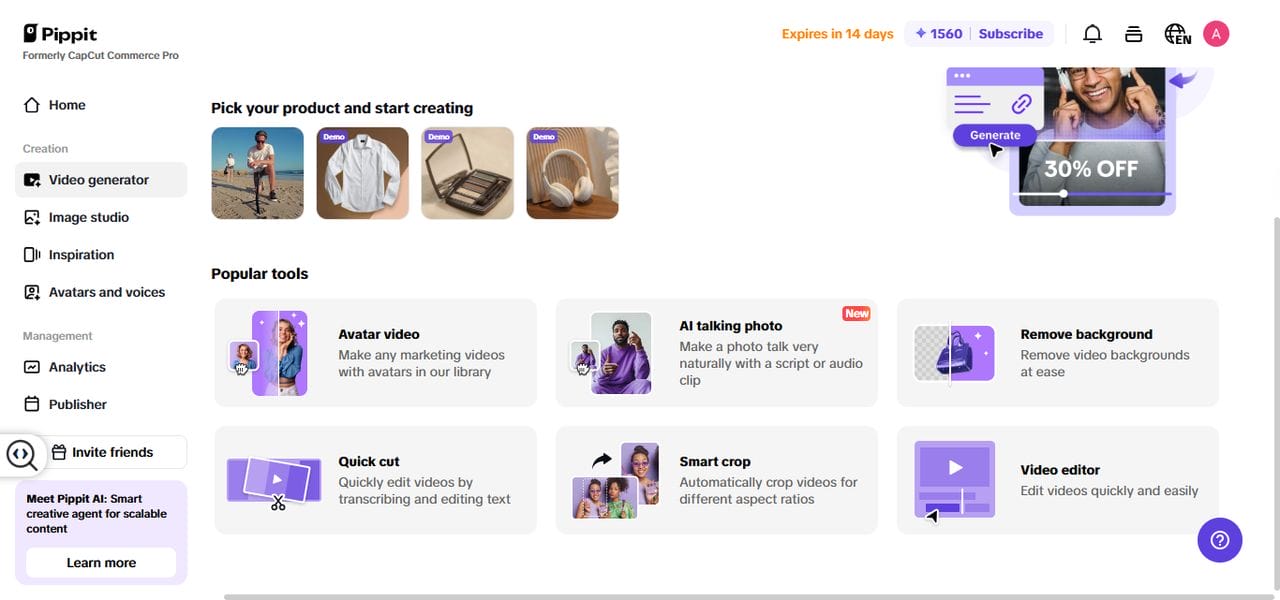
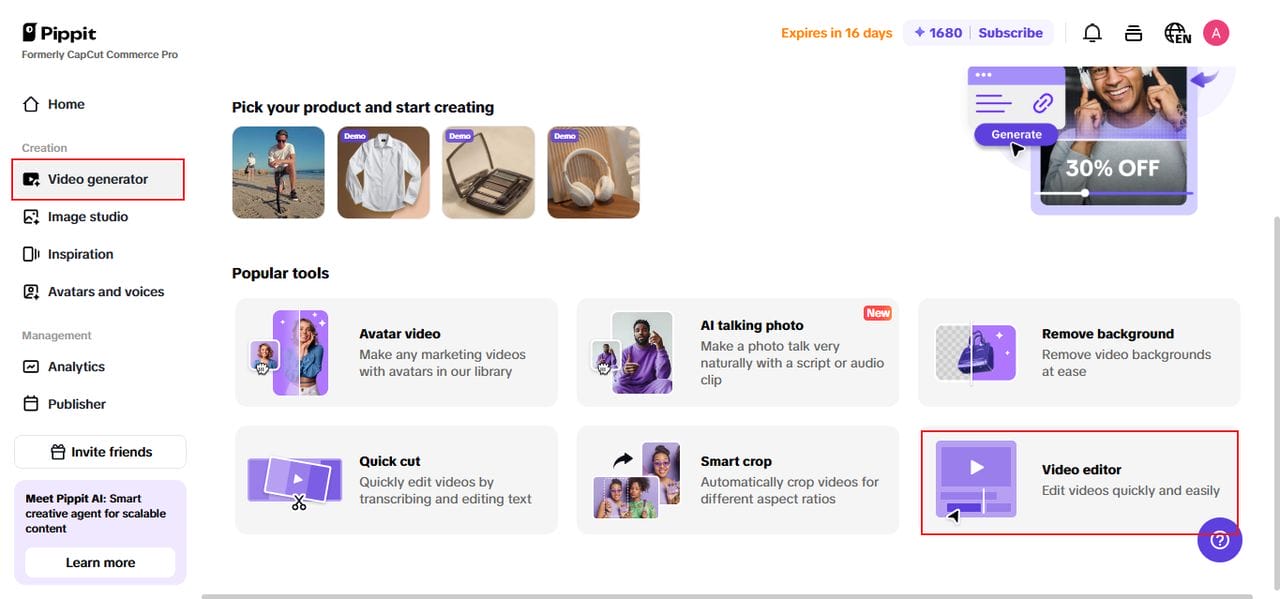
Start by registering for Pippit to gain access to its home dashboard. Under the left-hand menu, choose “Video generator,” and subsequently click on “Video editor.” To upload your content, either click on “Click to upload” or drag and drop the file onto the editing area itself.
Step 2: use the video trimmer tool
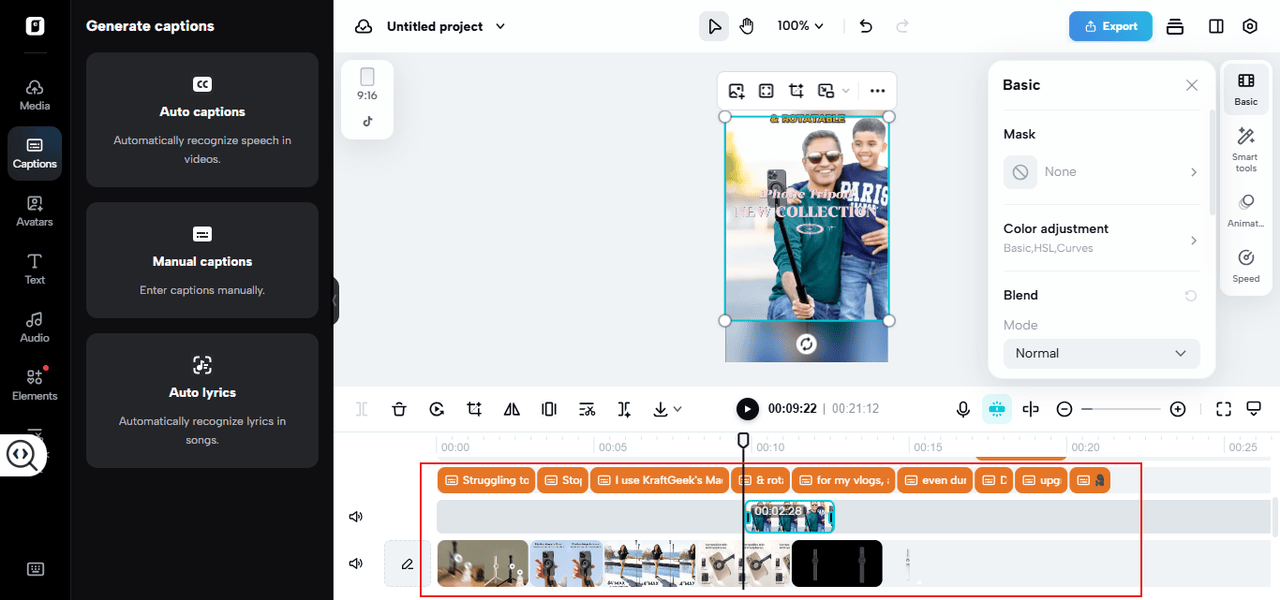
Select the video on the timeline and drag the transform handles at the end to trim away unimportant seconds. Have to get rid of an embarrassing pause or dated section in the middle? Drag the Playhead to the relevant frame, click “Split,” and delete the unwanted segment.
Step 3: export or share the trimmed video
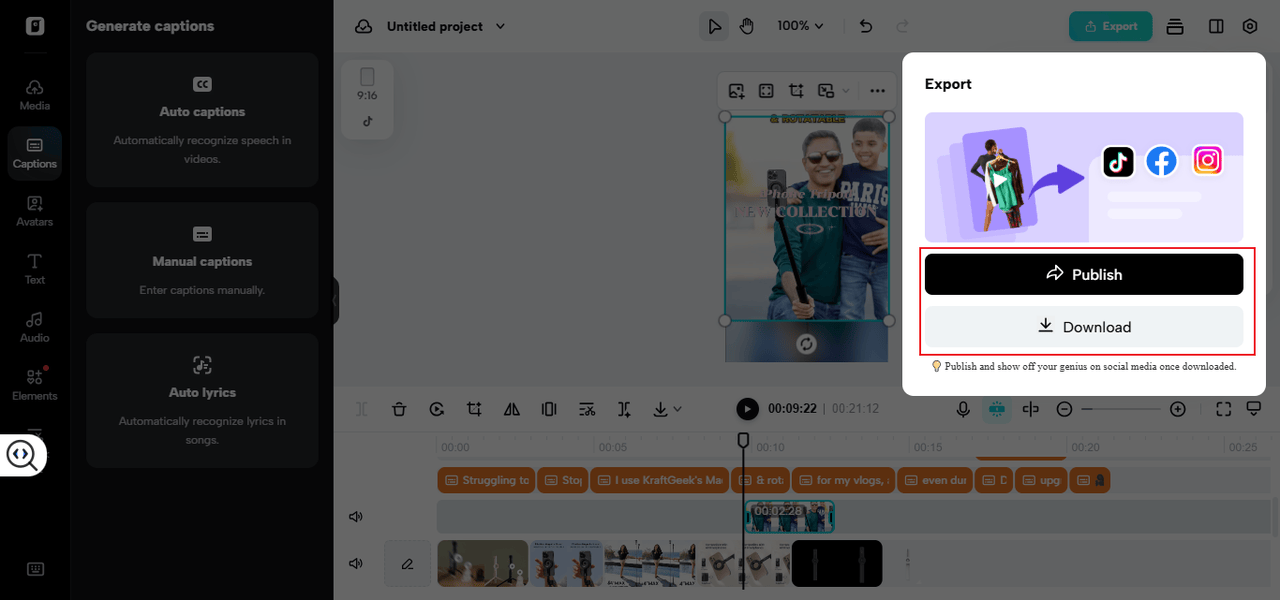
Once you’re satisfied with your edits, tap “Export” in the top-right corner. You can then select your preferred resolution, format, and frame rate to complete and save your video. Or, skip the download and click “Publish” to post it straight to your internal networks or training sites.
Humanizing the digital: why it works so well
Learners Want Relatable Content – A casual business avatar explaining harassment policies or guiding a new hire through benefits enrollment is far more compelling than a bland email or thick manual. The intersection of visual and voice memory is what grabs one’s attention, reinforces the key points, and brings clarity to abstractions.
Scalable for Any Size Team – Whether you’re hiring five people or five hundred, an AI-generated training video doesn’t care. You can train with ease at scale between departments and geographies, so all employees learn the same way.
The bottom line: less hassle, more value
HR professionals didn’t go into the business to spend hours editing video or managing voiceover scripts. And with AI tools like Pippit AI, they don’t have to. From simplified onboarding to more interesting compliance rollouts, companies are making tedious tasks smarter, scaleable video solutions.
In today’s globalized market, where attention is fleeting and teams are geographically dispersed, AI-created videos present a strong solution by providing clarity, consistency, and, most importantly, significant time savings. And that’s one that HR teams can clock in for, seven days a week.